


Pick an element
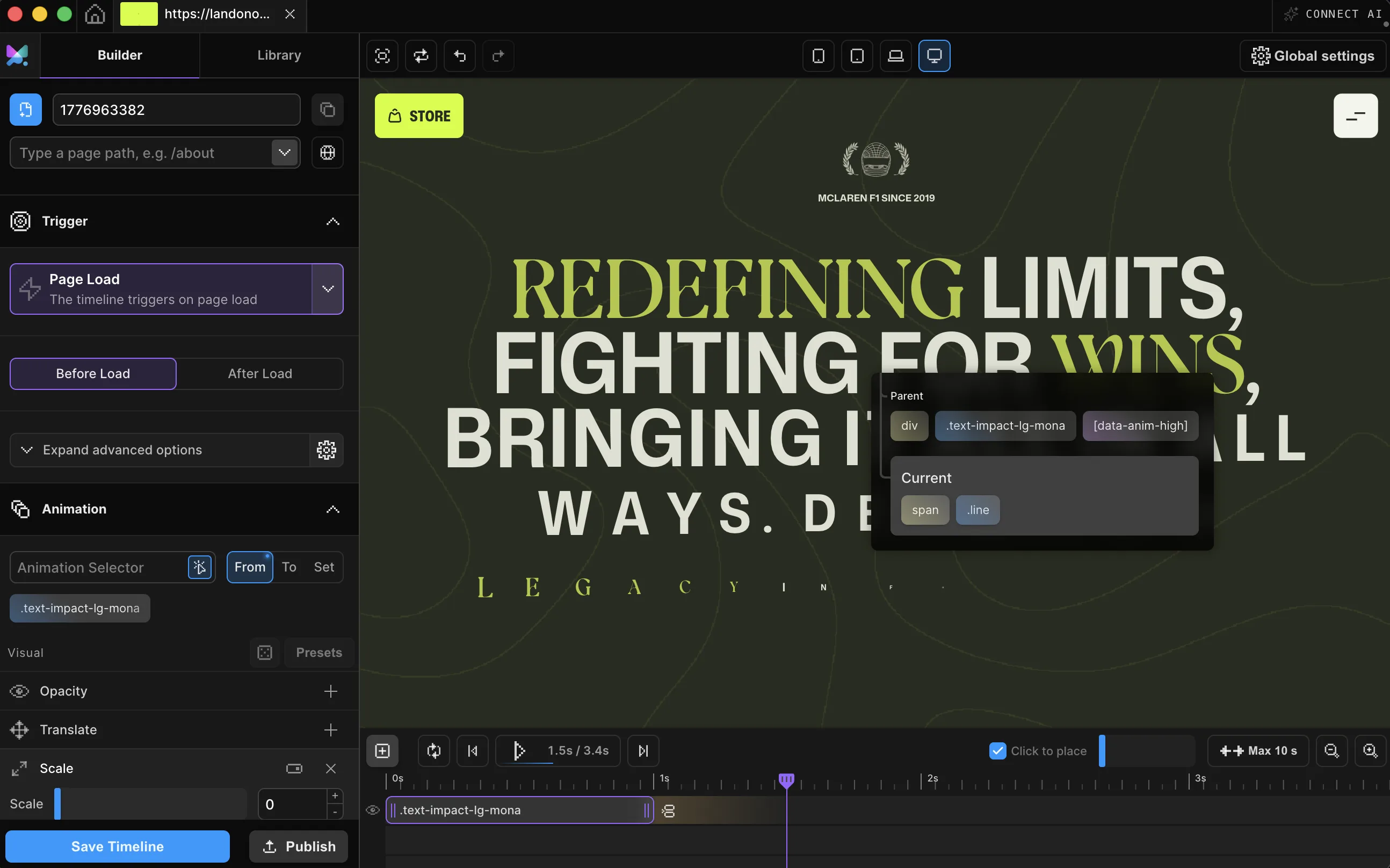
Click anything on your page. The Builder edits the live site, not a mockup.
Parallax that follows the cursor, cards that tilt toward it, and a custom cursor with its own physics, built by dragging sliders instead of writing pointer math. On a mouse or trackpad, this hero follows the cursor. Your mobile visitors get a clean fallback.
Meet Motion.page: All-in-One platform for web animation · YouTube
In the Builder, Mouse Movement swaps the trigger, not the timeline: pick Axis or Distance with one switch, then set the smoothing with one slider.

The hero's parallax, as a Builder timeline: Axis mode, Smoothing 0.1. Builder v3.2.10.
Click anything on your page. The Builder edits the live site, not a mockup.
Pick Axis to map pointer position, or Distance to map proximity: one dropdown, and the timeline stops listening to the clock.
Choose how much of the page reacts (one card, one section, or everything), then publish clean code to your site.
Works with every platform you already use



















Mouse Follower skips the timeline entirely. You're not animating an element, you're designing the cursor itself. Everything below is a panel control, not a script.

You just watched the pointer drive the hero above and the cursor in this section. Both come from Mouse Movement and Mouse Follower triggers you can set up on your own site in a few minutes.
Pointer-reactive animation has a reputation for jank. The engine running this page was built to avoid it.
The hero's near orb, as code (in the Builder, this is generated for you):
Motion("orb", ".orb-near", {
  from: { x: "-16%" },
  to: { x: "16%" },
  axis: "x",
}).onMouseMove({ type: "axis", smooth: 0.1 });A mouse movement animation responds to where the pointer is, not to time or scrolling. Instead of playing once, the animation's progress follows the cursor: move right and it advances, move back and it rewinds, all softened by a smoothing value you choose.
Axis mode maps the pointer's horizontal and vertical position to progress: the classic mouse parallax, where layers drift as the cursor crosses the page. Distance mode maps proximity instead: the closer the pointer gets to a target's center, the further the animation runs, which is the recipe behind magnetic buttons and proximity reveals.
Motion.page adds a third control: scope. A trigger can watch the whole viewport or a single element, and with per-element triggering every card in a grid reads only its own pointer, so one timeline produces many independent reactions. Smoothing runs 0 to 1, where 0 is instant and higher floats behind the pointer. (The Mouse Follower's smooth dial runs the other way: higher is snappier.)
Timelines published as local code live in your own site and keep running; they don't phone home. CDN-hosted delivery (where we host and serve the animation file for you) and further editing require an active license.
No. Select an element, switch the trigger to Mouse Movement, choose Axis or Distance, and set smoothing with a slider. The X and Y folders in the timeline let you animate both directions independently.
Yes. It's a Distance-mode recipe: scope the trigger to the element, set the start and leave progress to 0, and animate a small translate. The element eases toward the cursor as it approaches and settles back when it leaves.
That's the Mouse Follower trigger: a custom cursor with presets, hover and pressed states, squeeze physics, and text or media variants. It's a separate trigger in the same dropdown.
You can, but a hand-rolled listener tends to call getBoundingClientRect on every frame, keeps updating after the pointer stops, and fires again on the synthetic mouse events touch browsers send after a tap. Motion.page's engine shares one passive listener per target, freezes target bounds between resizes, stops doing work once smoothing settles, and filters out touch-generated mouse events automatically.
Nothing breaks. The engine filters the fake mouse events touch browsers fire, the custom cursor never starts on touch-only devices, and you can disable any timeline per device from the panel.
Yes. Mouse Movement, Mouse Follower, and Cursor Tooltip ship in both the Motion.page WordPress plugin and the Desktop app; and the plugin animates whatever your page builder renders, including Elementor, Bricks, Divi, and Gutenberg sections.
Still deciding? Compare plans →
Animations, shaders, or both. Flat pricing, no per-seat math.
Instant access, in Motion.page for WordPress and Desktop.