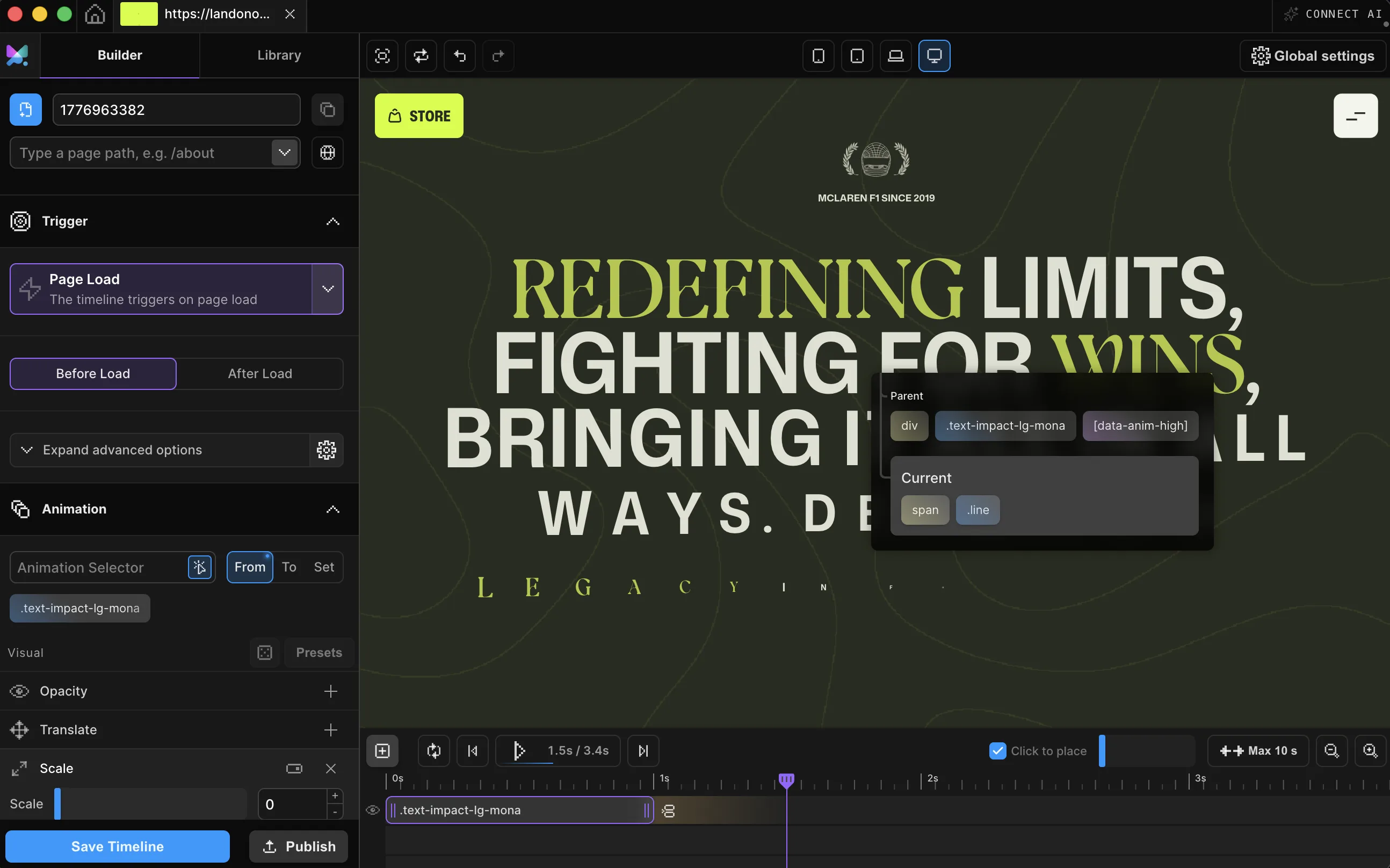
VISUAL BUILDER
Pick a thing. Make it move.
Click any element on your live page, choose a trigger, and drag the timing until it feels right. If you can use Figma, you already know how to use this.
Point at your live site, animate it visually, and walk away with clean, zero-dependency code. Scroll, hover, text, cursors — it's all in here.
Works with every platform you already use


















Grab any element on your live page, choose a trigger, and set the timing. Motion.page writes the same SDK code a senior dev would, then hands it over.
Explore plansHere's everything the builder does — point, click, animate, and ship.
Click any element on your live page, choose a trigger, and drag the timing until it feels right. If you can use Figma, you already know how to use this.

Pinned sections, scroll-scrubbed timelines, layered parallax — the stuff that usually eats a week of JavaScript. Here it's an afternoon.

Publish to the CDN and paste one script tag into any site. Or download the bundle, SDK plus your animations, and host it yourself. Yours either way.

The point-and-click animation studio you just scrolled through. Runs as a desktop app or straight inside WordPress as a plugin.

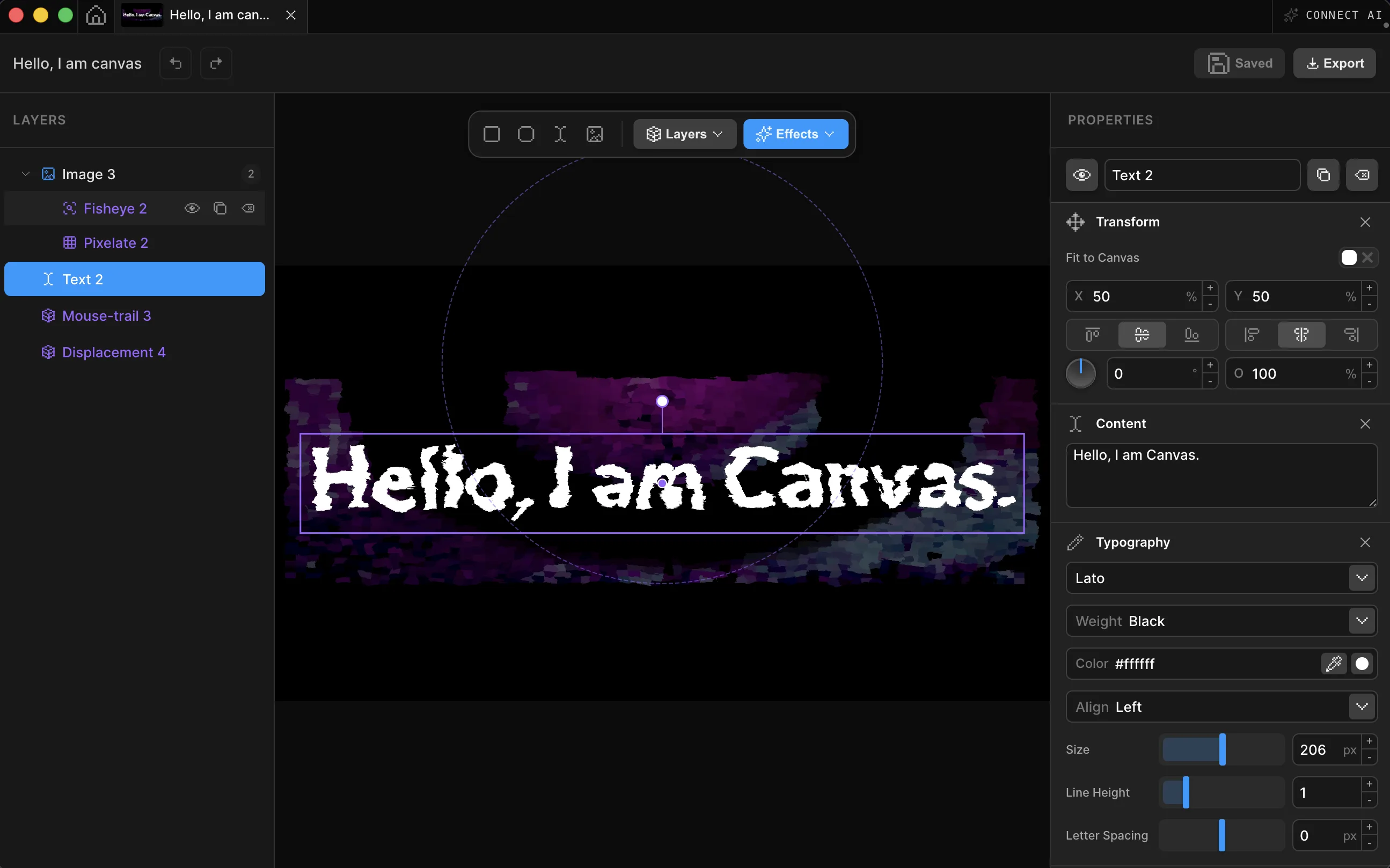
A WebGPU shader editor you drive like a design tool. Compose in 2D, mix in 3D objects, and export to code, image, or video, all inside the desktop app.

Every animation in Builder and Canvas runs on the Motion.page SDK. It's free on npm, has zero dependencies, and comes fully typed. Pull it into any project.
Canvas is a complete WebGPU visual production editor—with a real video timeline, not a folder of shader presets. Direct it with AI, refine layers, effects, and keyframes, then publish a live website embed or export MP4, GIF, and stills for social, ads, video, and promo.


WordPress, React, Astro, Webflow, Shopify, plain HTML — Motion.page drops into whatever you've already built. Your stack stays exactly as it is.
WordPressReactVueAstroElementorHTML5ShopifyWebflowWixBricksClaudeOxygenNext.jsSvelteTailwindNuxtAngularFramerSquarespaceDrag, stretch, and stack animation entries like clips in a video editor. Every change previews live on your actual site. When it looks right, it is right.
Learn morefrom, to, duration, ease — pass a plain object and you're done. You'll have it memorized before your coffee cools.
Learn moreCascade from the center, ripple from the edges, or randomize across a grid. It stays smooth when the element count gets silly.
Learn moreChain .onScroll(), .onHover(), .onClick(), .onGesture() and friends on a single animation. Scroll-driven parallax that also reacts to hover? That's two lines, and there's nothing extra to install.
Learn moreSplit by chars, words, or lines. Reveal through a cinematic mask. Flip like an airport departure board. Scramble through katakana. Every effect is one property, and they stack.
Learn moreOne animation engine, three ways to drive it — a full desktop studio, a one-click WordPress plugin, or the raw SDK. Everything you build compiles down to the same zero-dependency code.
npm i @motion.page/sdk 
"Genial and perfect tool. Motion Page is the most incredible tool to create complex and amazing animations with less time. I'm very impressed with the fast learning corve. MP was my favorite investment."
Andre Beltrame
"Brilliant and innovative. The next big thing in online animation. Very well crafted and very thought through."
Rene Brokop
"Once you dig and understand how the animations work, you start to see opportunities to make your website so much more interactive and modern looking than ever before."
Jonathan JerniganAnimations, shaders, or both. Flat pricing, no per-seat math.