



Project Brief
Scope, budget, and the timeline: one page.
Most hover effects look fine until the pointer leaves and everything snaps back. Motion.page treats the exit as half the animation: pick what happens when the cursor moves on, wire it to any element visually, and publish. Hover the cards below to feel it.The cards below react to a mouse or trackpad; on touch they rest, because hover needs a pointer.
Project Brief
Scope, budget, and the timeline: one page.
Shoot Notes
Location, crew call sheet, and Tuesday's shot list.
Invoice #114
Net 30, due the 18th, paid on delivery.
Meet Motion.page: All-in-One platform for web animation · YouTube
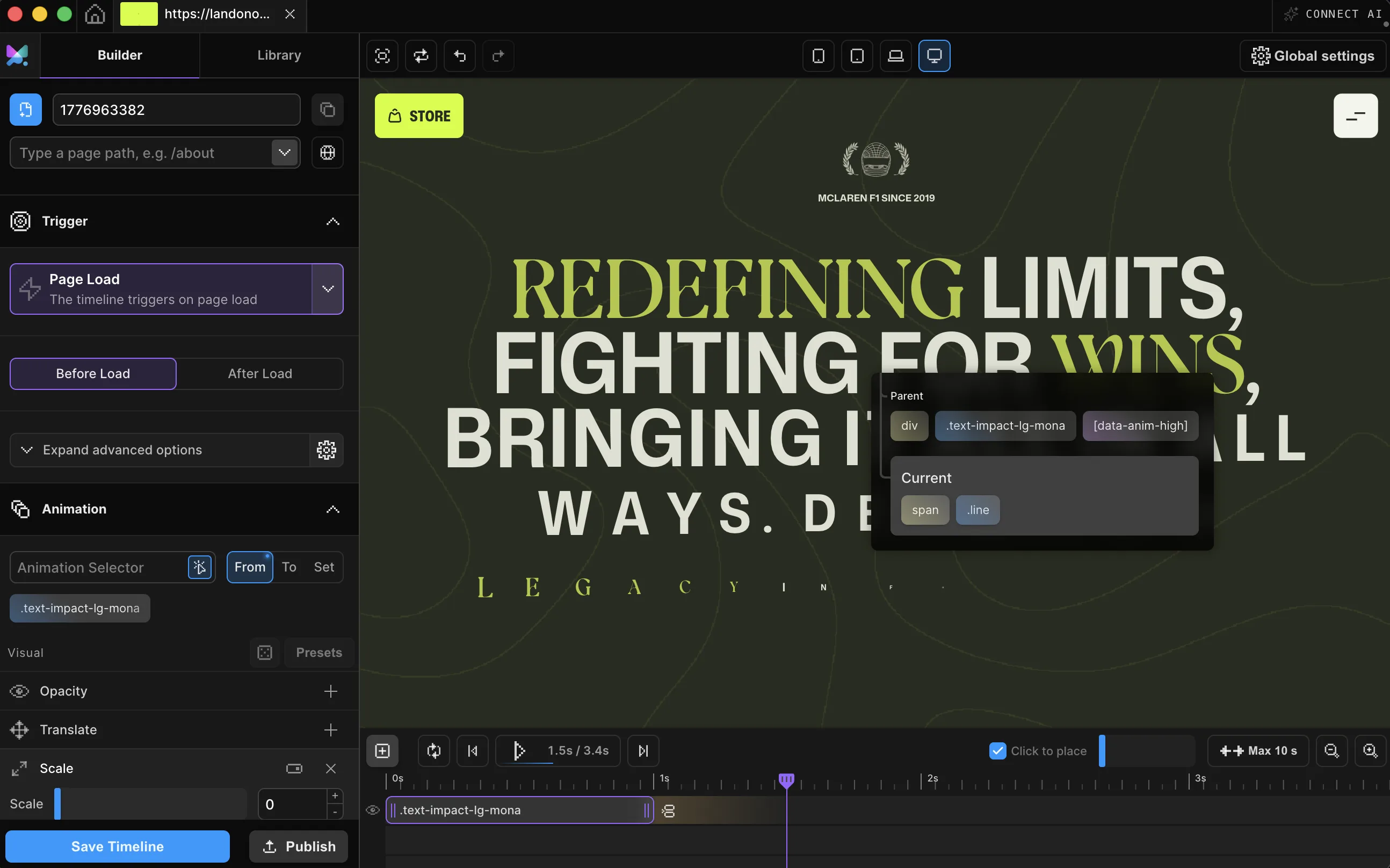
In the Builder, hover is a trigger on an ordinary timeline. Point it at an element, decide what entering starts, and use the Mouse Leave switches for what leaving does. Presets work here too, if you'd rather not start from zero.

.shop-card, each iteration triggered individually, Reverse animation on for the leave. Builder v3.2.10.Click anything on your page (a card, a nav link, a button). The Builder edits the live site.
Tell it what to watch: the element itself, or a parent card. For grids, one switch gives each card its own reaction.
Reverse, pause, stop, or restart: one switch list decides what happens the instant the pointer exits.
Works with every platform you already use



















Reverse is the usual choice. It isn't the only one. Hover each card to compare all five.On a mouse or trackpad, hovering each card shows the difference.
Eases back to rest the moment the pointer leaves.
Freezes mid-motion, exactly where the pointer left it.
Snaps back to the start: no reverse journey.
Snaps to the start, then plays forward once more.
Stays put. Nothing plays until the next hover.
onLeave in the Motion engine · the Builder's Mouse Leave switches cover reverse, pause, stop, and restart
You just tried all five exits. Setting one up on your own site takes a few minutes.
Hover states have a reputation for jank at scale: flickering hitboxes, one listener per element. The engine running this page was built to avoid both.
A hover animation responds to the pointer resting over an element rather than to a click, the clock, or the scrollbar. The cursor arrives and the element reacts. When the cursor leaves, one of five behaviors decides what happens next.
Reverse plays the animation backward to its start state, the default and the right choice for most lifts and reveals. Pause freezes the timeline exactly where it is. Stop resets it to the start without reversing through the motion. Restart snaps back and replays forward. None leaves it exactly as it landed.
Motion.page adds scope: a Hover trigger can watch one element or, with Play each iteration individually on, give every matched element in a list its own independent trigger, so a grid of cards responds one at a time instead of all reacting to whichever one you're pointing at.
A CSS :hover flips properties; the Hover trigger runs a timeline. That's several properties in sequence, per-card independence in a grid, a leave delay that cancels itself, and your pick of four leave behaviors beyond reverse, none of which CSS can express. You build it visually, and the published code is dependency-free.
One trigger call on a normal timeline: .onHover({ each: true, onLeave: "reverse" }). The Builder generates that exact call. Pick Mouse over and a Mouse Leave behavior in the panel, and they become the target, each, and onLeave options.
Yes, Motion.page animates the page your builder outputs. Click any element Elementor, Bricks, Divi, or Gutenberg rendered, attach the Hover trigger, and publish. No custom-code fields, no theme edits.
No, a hover animation needs a pointer that can rest over an element, and touchscreens don't have one. Pair the same element with a Click trigger, or give it a Page Load entrance, so touch visitors still get an animated moment.
Only if you want them to. With Play each iteration individually off, every matched element shares one timeline and reacts together. Switch it on and each element gets its own independent trigger and rest-position bounds.
Yes. The Hover trigger ships in both the Motion.page WordPress plugin and the Desktop app, with the same Mouse over scoping and Mouse Leave controls.
Timelines published as local code live in your own site and keep running. They don't phone home. CDN-hosted delivery (where we host and serve the animation file for you) and further editing require an active license.
Still deciding? Compare plans →
Animations, shaders, or both. Flat pricing, no per-seat math.
Instant access, in Motion.page for WordPress and Desktop. Animations published as local code keep running on your site, even if you cancel.