



Pick your elements
Select what should greet a visitor first, directly on your live page. It can be a single element or an entire section.
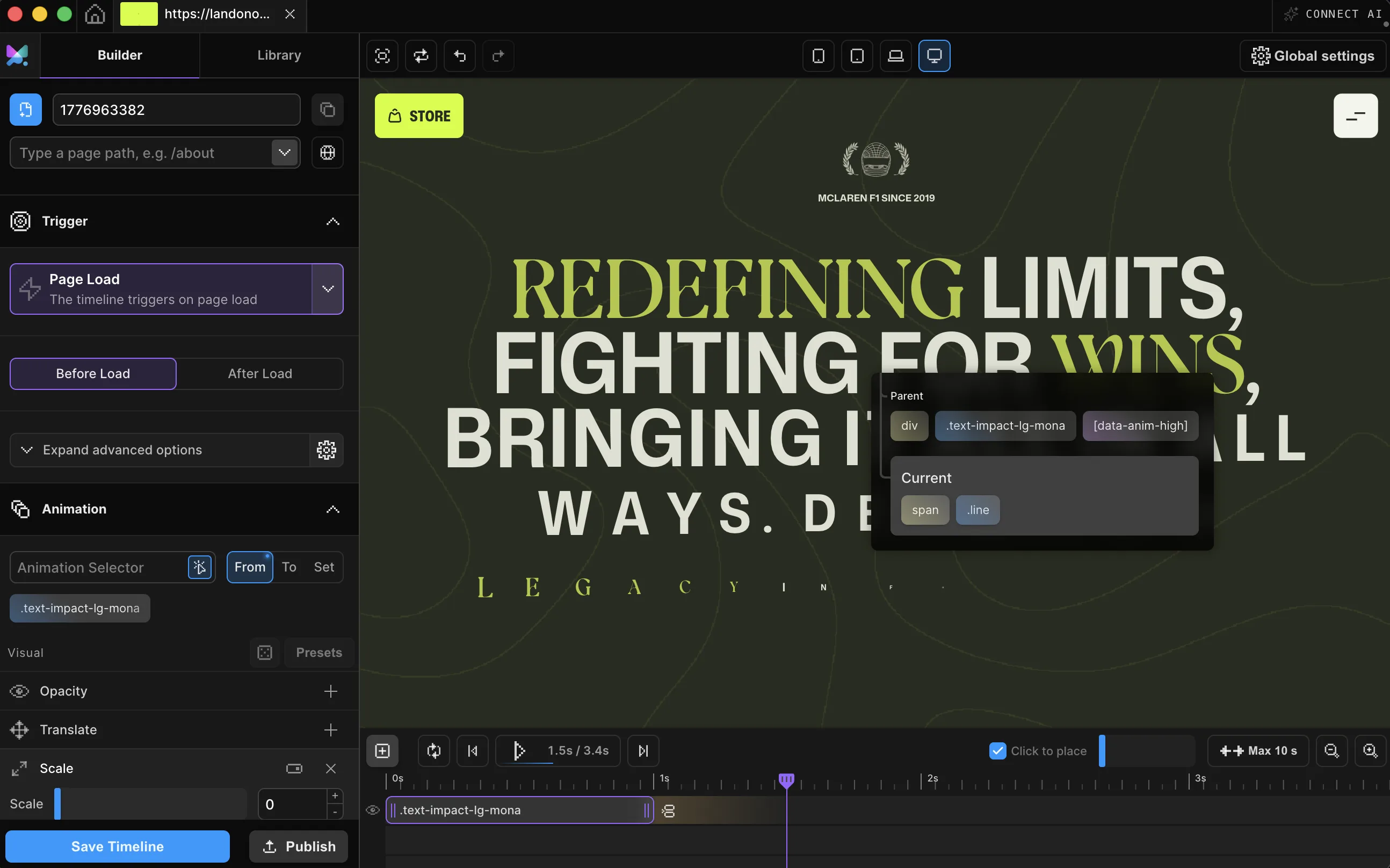
Everything on this page just entered: the headline masked in word by word, the actions following it. That's a Page Load timeline, the same kind you build by picking elements and a load timing, not writing a DOMContentLoaded listener. Replay it below whenever you like.
Meet Motion.page: All-in-One platform for web animation · YouTube
Page Load is the default trigger on every new timeline. Give an element a from-state, or start from a preset such as Smooth Transitions, Creative Effects, or Text Reveals, then choose Before Load or After Load. Every visitor gets the same entrance.

Select what should greet a visitor first, directly on your live page. It can be a single element or an entire section.
Before Load starts the entrance right away, even while images are still downloading. After Load holds it until the whole page is visible, so nothing animates into a half-loaded layout.
Space multiple elements out with Stagger so they land as a sequence, not a pile, then publish clean code to your site.
Works with every platform you already use



















The headline and actions at the top of this page entered on a Page Load timeline. Wiring the same trigger to your own elements takes a few minutes.
Page Load isn't a single event. It's a choice of when in the page's lifecycle your entrance is allowed to run.
A staggered entrance as published code: in the Builder, this is the trigger panel plus the animation properties. position is when each entry starts in the sequence. Motion SDK, Builder v3.2.10:
Motion("welcome", [
  { target: ".badge", from: { opacity: 0, y: 14 }, duration: 0.4 },
  { target: ".heading", from: { opacity: 0, y: 22 }, duration: 0.5, position: 0.1 },
  {
    target: ".chip",
    from: { opacity: 0, y: 16, scale: 0.92 },
    duration: 0.45,
    stagger: { each: 0.08, from: "start" },
    position: 0.25,
  },
  { target: ".cta", from: { opacity: 0, y: 14 }, duration: 0.4, position: 0.55 },
]).onPageLoad();An entrance animation is what a visitor sees the moment a page appears, not content that just blinks into place, but a hero that fades and rises, a card grid that cascades in, a page that settles into view like it was choreographed, because it was.
Motion.page builds it visually on the Page Load trigger, the default on every new timeline. The Builder offers two timings: Before Load, which fires at DOMContentLoaded, and After Load, which waits for window.load, once images and styles have finished.
Add Stagger to space multiple elements into a sequence instead of a single flat reveal, then publish. The result runs as zero-dependency code on the site itself, in WordPress or Desktop, with no lost entrances even when the script loads late.
Your content is server-rendered visible. It exists in the HTML before any script runs, and the published animation code is zero-dependency, so there's no library download in the critical path. The hidden start state is applied only once the script loads. A long entrance on the largest element can still affect perceived speed, so keep hero entrances short, but nothing here blocks rendering.
For one element fading in, CSS is fine. An entrance is usually a sequence (badge, heading, cards, CTA, staggered and eased against each other), and sequencing keyframes by hand means redoing the delay arithmetic every time one piece changes. Here it's a timeline you shape visually, published as zero-dependency code.
Select the element, keep the default Page Load trigger, set its From opacity to 0, pick Before Load or After Load, and publish. The published script applies the hidden start as it loads, then plays the fade: no keyframes, no listener.
Elements render in their normal, final state until the published script loads and snaps them to the entrance's hidden starting point. On a typical page load that switch is imperceptible. On a very slow connection there can be a brief flash of the un-animated layout first. Visitors without JavaScript simply see the page in its final, fully visible state.
Choose After Load timing. It fires on the browser's window.load event, which waits for images, stylesheets, and other subresources to finish. Before Load fires earlier, at DOMContentLoaded, before those assets are guaranteed to be ready.
Yes, Page Load is a trigger, Stagger is a property on the timeline underneath it. Point Stagger at more than one element with an Each or Amount value and a From origin (start, center, edges, random), and the whole set enters as a cascade instead of all at once.
Yes, two ways. Loop a single element's animation with its own Repeat, or loop the whole entrance from the Page Load trigger's advanced options. Both use -1 for infinite.
Yes. Page Load ships in both the Motion.page WordPress plugin and the Desktop app, with the same Before Load / After Load controls.
Timelines published as local code live in your own site and keep running. They don't phone home. CDN-hosted delivery (where we host and serve the animation file for you) and further editing require an active license.
Still deciding? Compare plans →
Animations, shaders, or both. Flat pricing, no per-seat math.
Instant access, in Motion.page for WordPress and Desktop. Animations published as local code keep running on your site, even if you cancel.