



Pick your SVG element
Click any stroked shape on your page. The Builder edits the live SVG, not a copy.
Reveal a logo, icon, diagram, or signature stroke by stroke: the hand-drawn look you see on premium sites. Works on any stroked SVG shape, wired to page load or scroll in a visual editor, without writing code.
Meet Motion.page: All-in-One platform for web animation · YouTube
Select the shape, enable DrawSVG strokes, and set where the stroke starts and ends. The Builder shows the hidden FROM state exactly as it will render before the draw plays.

Click any stroked shape on your page. The Builder edits the live SVG, not a copy.
Open the Animate SVG tile and enable DrawSVG strokes. Drag the range from 0% to 100% to draw the whole shape, or dial in any window.
From-only reads what's already on the page, so one value is often enough. Publish clean code with zero dependencies.
Works with every platform you already use















You drew that whole figure with your scrollbar. The same scrubbed range wires to your own shape in the Builder.
Inside the Visual property list, the Animate SVG tile holds DrawSVG strokes (a range slider plus two % fields) next to Stroke color and Fill color, so a draw-on can recolor as it goes.
A draw-on-load, as published. In the Builder, this is two sliders. Motion SDK, Builder v3.2.10:
Motion('logo-draw', '.logo path', {
  from: { drawSVG: '0% 0%' },
  to: { drawSVG: '0% 100%' },
  duration: 1.4,
  ease: 'power2.inOut',
  stagger: { each: 0.12 },
}).onPageLoad();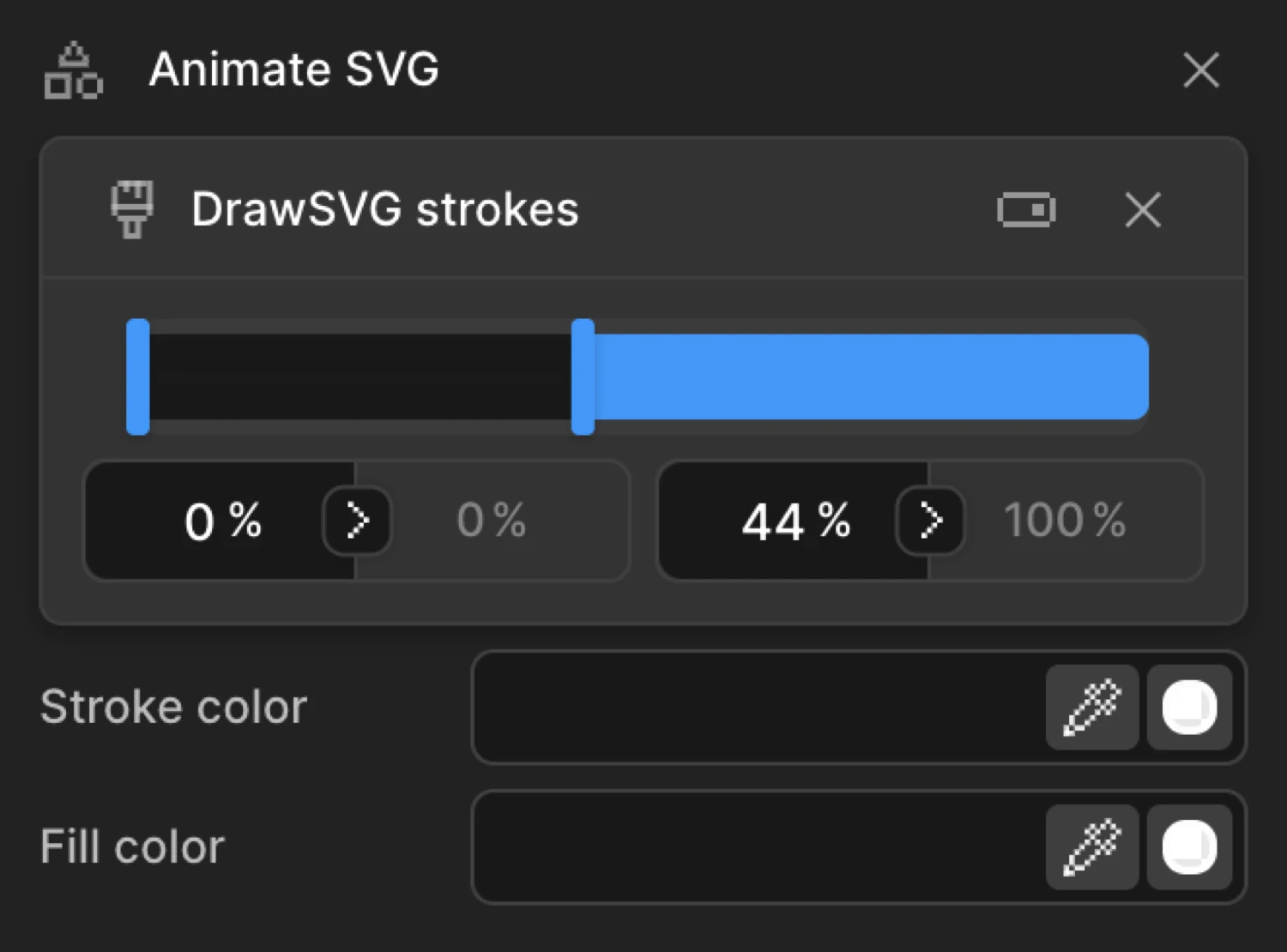
A range slider looks simple. Here's what the engine handles to keep it that way.
SVG line animation is an effect where a stroke appears to draw itself: a logo, an icon, a signature, or a diagram renders progressively, from a bare outline to the finished shape, instead of simply appearing.
The technique behind it is a CSS trick applied to SVG: stroke-dasharray carves a stroke into a dash pattern, and stroke-dashoffset shifts where that pattern begins. Set the dash to match the shape's full length and slide the offset from one end to the other, and the stroke appears to draw itself into view.
Motion.page builds both sides of that technique visually: pick the shape, set a start and end percentage (or a pixel range, or a mix of both), and publish. Combine the draw with stroke and fill color tweens in one animation for a logo that recolors as it completes.
A line-drawing effect for SVG strokes: the shape appears to draw itself, from a bare outline to fully rendered. Under the hood it animates stroke-dasharray and stroke-dashoffset. Motion.page just gives you a visual range slider instead of the raw CSS.
No. Pick an element, open the Animate SVG tile, enable DrawSVG strokes, and drag the range. Developers can reach for the SDK directly, the same drawSVG property either way.
Anything with a measurable stroke length, checked at runtime, not from a fixed list. In practice that's path, circle, ellipse, line, polyline, polygon, and rect.
Yes, the shape needs an existing visible stroke. DrawSVG doesn't add one or convert a filled shape into a stroke for you. If your logo or icon is filled only, give it a stroke first, in your SVG editor, or with the panel's own Stroke color field.
The engine is Motion.page's own. You're not buying the technique, you're buying the workflow: click a shape on your live page, drag a range slider, preview the exact FROM state, and publish clean dependency-free code to WordPress or Desktop. If you'd rather hand-write it, the SDK is right there too.
It can. A from-only draw paints the finished stroke until the timeline initializes. Pre-hide the shape with one line of CSS (stroke-dasharray: 1 1; stroke-dashoffset: 1) and give the animation an explicit to range like 0% 100%. The demos on this page do exactly that.
Yes. DrawSVG strokes are available in both the Motion.page WordPress plugin and the Desktop app, with the same panel.
Timelines published as local code live in your own site and keep running; they don't phone home. CDN-hosted delivery (where we host and serve the animation file for you) and further editing require an active license.
Still deciding? Compare plans →
Animations, shaders, or both. Flat pricing, no per-seat math.
Instant access, in Motion.page for WordPress and Desktop. Animations published as local code keep running on your site, even if you cancel.